학습기록남기기
Spring Boot Swagger + Srping Security 본문
1.maven 추가
<dependency>
   <groupId>io.springfox</groupId>
   <artifactId>springfox-swagger2</artifactId>
   <version>2.9.2</version>
</dependency>


<dependency>
   <groupId>io.springfox</groupId>
   <artifactId>springfox-swagger-ui</artifactId>
   <version>2.9.2</version>
</dependency>
2.Swaager configiuration file 추가
@Configuration
@EnableSwagger2
public class SwaggerConfiguration {

    //작성한 get ,post ,delete 등 내가 작성한 여러 메서드 설명 -- 테스트 하기 유용함

    //localhost:8282/swaager-ui.html 로 접속
    @Bean
    public Docket api() {
        return new Docket(DocumentationType.SWAGGER_2)
                .apiInfo(apiInfo())
                .select()
                .apis(RequestHandlerSelectors.basePackage("com.blog.project.controller.api")) //베이스가 될 패키지명 작성
                .paths(PathSelectors.any())
                .build();
    }

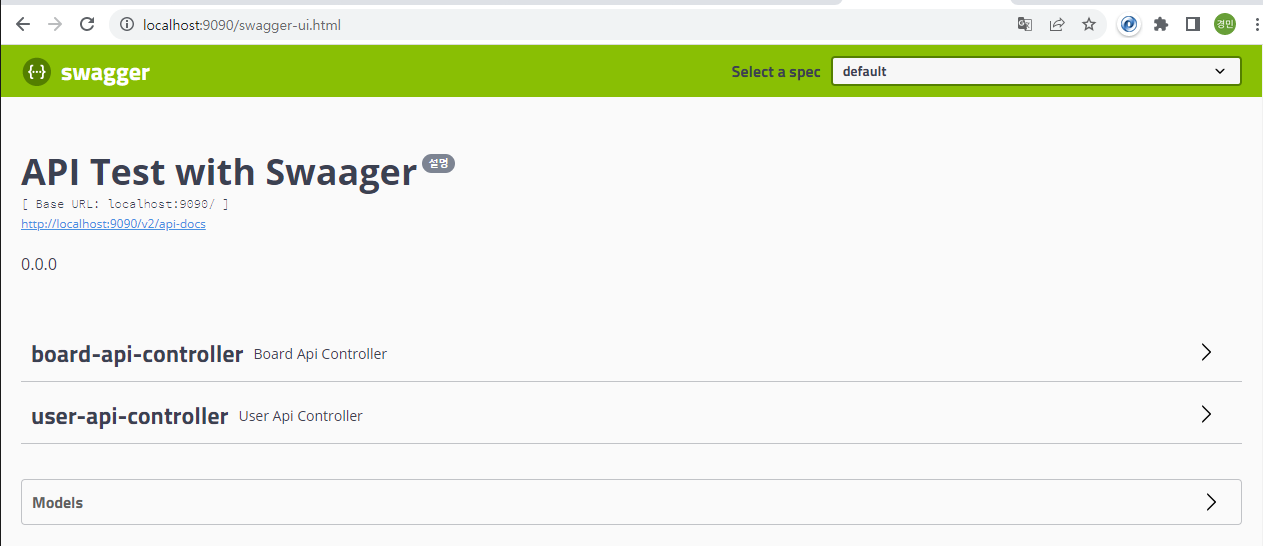
    public ApiInfo apiInfo() {
        return new ApiInfoBuilder()
                .title("API Test with Swaager")
                .version("설명")
                .description("0.0.0") //maven 1.0.0 라고 수정해놨기 때문
                .build();
    }
}
3.Spring Security에 configure 메서드에 허용되는 url 입력
"/v2/api-docs", "/configuration/**", "/swagger*/**", "/webjars/**"↑Swaager2.9.2 사용하기 위한 허용 URL 필수*
@Configuration
@EnableWebSecurity
@EnableGlobalMethodSecurity(prePostEnabled = true)
public class SecurityConfig  extends WebSecurityConfigurerAdapter {

				.....
                .....


@Override
protected void configure(HttpSecurity http) throws Exception {
    http
            .csrf().disable()
            .authorizeHttpRequests()
            .antMatchers("/", "/auth/**", "/js/**", "/css/**", "/image/**","/dummy/**","/check/**","/board/all/**","/v2/api-docs", "/configuration/**", "/swagger*/**", "/webjars/**")
            .permitAll()
            .anyRequest()
            .authenticated()
            .and()
            .formLogin()
            .loginPage("/auth/loginForm")
            .loginProcessingUrl("/auth/loginProc")
            .defaultSuccessUrl("/")
            .and()
            .oauth2Login()
            .loginPage("/loginForm")
            .userInfoEndpoint()
            .userService(principalOauth2UserService);
}

}
3. localhost:본인이 설정한 port번호 /swagger-ui.html 주소 입력